
Calibration
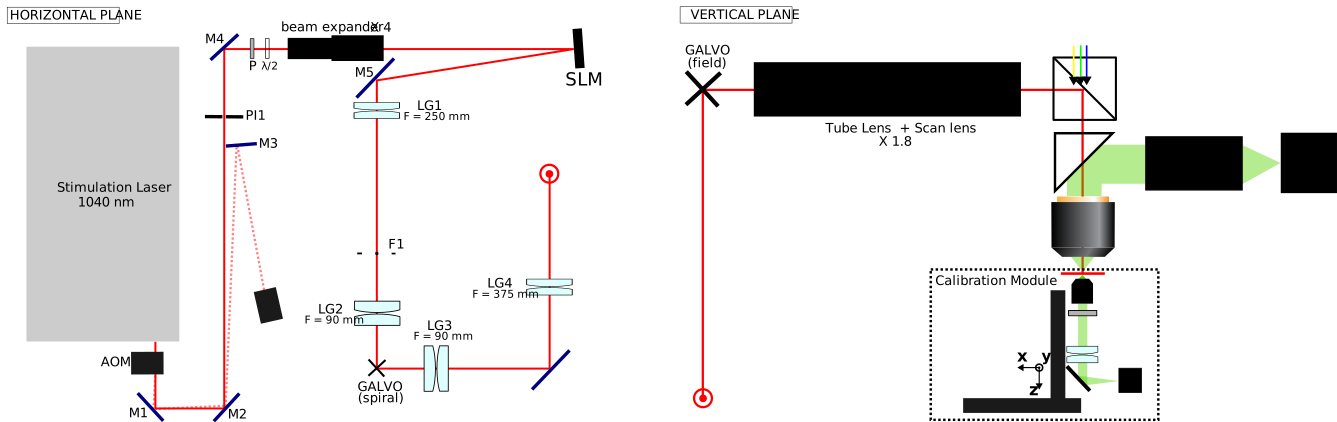
Part 1 — Two-photon Holographic Stimulation System
This calibration pipeline aims at assuring precise and uniform neuronal stimulation over a large 5 x 4.5 x 0.4 mm3 volume. To achieve this goal, we perform several steps:
- Define coordinates transformations between field galvanometers, calibration camera and calibration stages axis (step 0)
- Evaluate field galvanometer voltages-to-positions in the 2D FOV (steps 1 and 2)
- Estimate power-to-depth calibration to enable targeting specific depths with the SLM (step 3)
- Modeling non-telecentricity, field curvature, and residual targeting errors in 3D (steps 4 and 5)
Each calibration step builds on previous ones, creating a chain of dependencies that must be completed in order.
Calibration Sequence Overview
| Step | Script | Purpose | Prerequisites |
|---|---|---|---|
| 00 | coordinate_frame_calibration.py | Stage/galvo to camera transforms | —- |
| 01 | field_galvo_angle_calibration.py | Galvo voltage-to-angle mapping | Step 00 |
| 02 | field_galvo_lut_calibration.py | Wide FOV voltage correction | Steps 00, 01 |
| 03 | depth_calibration.py | SLM 3D depth (Z-axis) calibration | Steps 00, 01, 02 |
| 04 | field_aberration_calibration.py | Field aberration, telecentricity & curvature | Steps 00, 01, 02, 03 |
| 05 | telecentricity_refinement.py | Refine telecentricity with 3D holograms | Steps 00, 01, 02, 03, 04 |
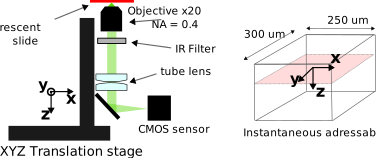 Figure: Calibration module : XYZ translation stage, objective lens (x20, NA=0.4), tube lens, IR filter, and CMOS sensor. The fluorescent slide is always positionned at focal plane of this inverted microscope
Step 00: Coordinate Frame Calibration
Calibrates the coordinate transformations between calibration camera pixels and physical positions for both the translation stage and field galvo.
Purpose
This script establishes the mapping between:
- Stage XY positions (mm) and camera pixels
- Galvo voltages (V) and camera pixels
Setup
Camera mounted on XYZ stage. Fluorescent sample at focal plane. SLM displays zero phase. Both galvanometer mirrors functional.
Workflow
- Initialize hardware (camera, SLM with zero phase, stage, DAQ controller)
- Move stage in X and Y, capturing spot positions to build stage transfer matrix
- Sweep galvo X and Y voltages, capturing spot positions to build galvo transfer matrix
- Compute affine transforms (rotation, scale, translation) for both systems
- Save calibration data and generate diagnostic plots
Outputs
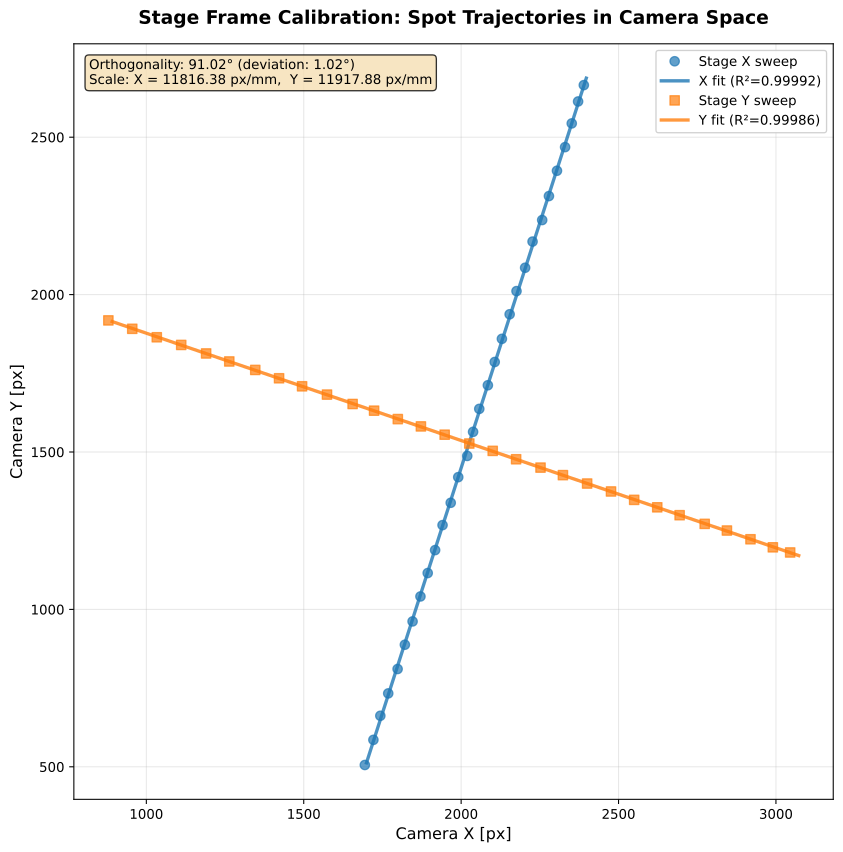
calibration_data/coordinate_frame_calibration.npz:- Stage transfer matrix (mm → pixels)
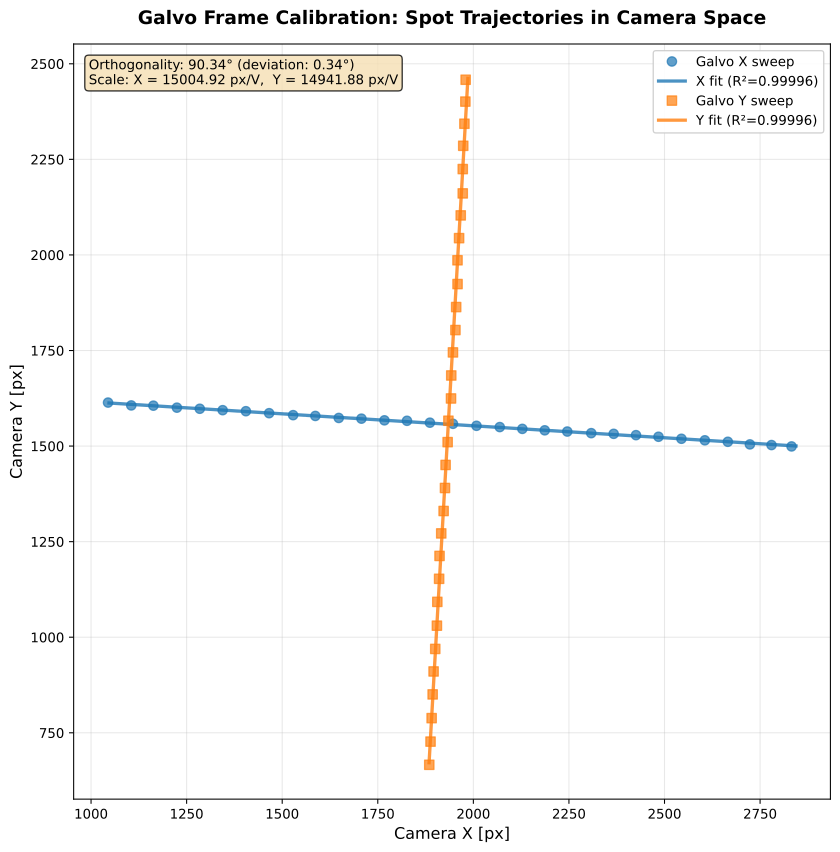
- Galvo transfer matrix (V → pixels)
- Magnification and effective pixel size
- Orthogonality metrics
calibration_figures/00_frame_calibration_stage.svg: Stage calibration plotcalibration_figures/00_frame_calibration_galvo.svg: Galvo calibration plot
| Stage calibration (mm → pixels) | Galvo calibration (V → pixels) |
|---|---|
 |  |
Step 01: Galvo Voltage-to-Angle Calibration
Determines the relationship between galvo voltages (V_x, V_y) and deflection angles (theta_x, theta_y) using the physical models:
theta = arctan(pos / f_eq) -> simple angle-to-position model for a perfect lens
theta = K @ (V - V0)    -> linear relationship between applied voltage and mirror angle
Where f_eq = 35/1.8 = 19.44 mm is the equivalent focal length.
Setup
Camera mounted on XYZ stage (fixed). We capture an image for every (V_x, V_y) pair.
Workflow
- Load stage transfer matrix from coordinate frame calibration (script 00)
- Generate random (V_x, V_y) pairs and measure spot positions in camera
- Convert camera pixels to physical positions using inverse stage transform
- Compute angles:
theta = arctan(pos / f_eq) - Fit coupled model:
theta = K @ (V - V0) - Decompose K matrix to analyze frame rotation vs true cross-coupling
- Generate visualization and save results
Outputs
calibration_data/galvo_voltage_to_angle.npz:- Coupling matrix K: Maps galvo voltages to deflection angles (rad/V)
- Center voltages V0: Zero-deflection operating point
- K decomposition: Rotation angle, gains, residual coupling ratio
calibration_figures/01_field_galvo_angle_calibration.svg: Calibration results
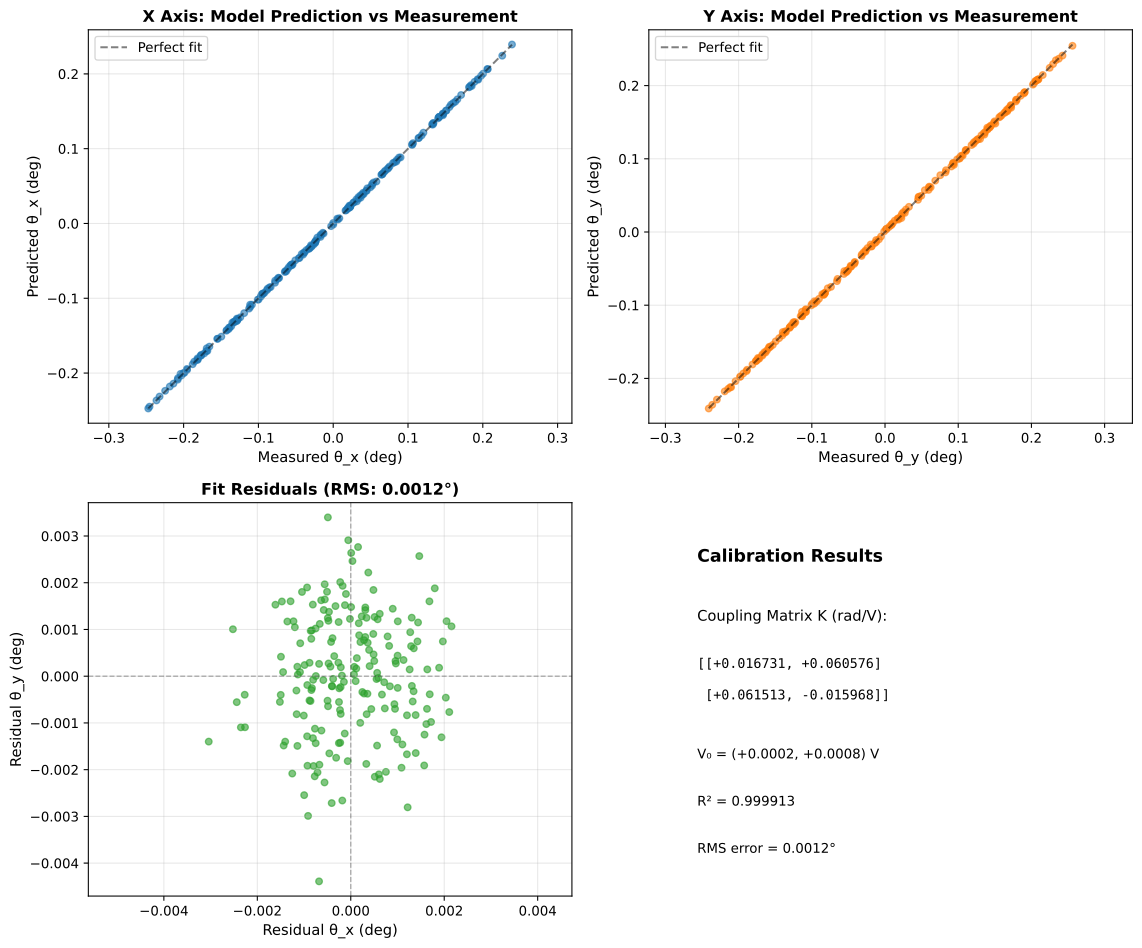 Figure: Galvo voltage-to-angle calibration showing predicted vs measured spot positions.
Step 02: Galvanometer LUT Calibration
The base model V = V0 + K^-1 @ arctan(pos/f_eq), used to calculate voltage values associated to a target position, ans estimated in step 01 is not accurate over a large FOV. This step 2 builds a position-dependent voltage correction using RBF interpolation:
V = V_model + c_V(pos)
Setup
Camera mounted on XYZ stage. When stage moves to position P and galvo is correctly calibrated for P, the spot appears at the same camera position as the reference spot.
Workflow
- Load galvo voltage-to-angle calibration (script 01) and coordinate frame calibration (script 00)
- Generate grid positions across the FOV (e.g., 8x8 = 64 points)
- For each grid point: set galvo voltage, move stage, measure spot error
- Reject outliers and exclude extreme corner points
- Build RBF voltage correction interpolator from filtered data
- Save LUT training data and plots
Outputs
calibration_data/field_galvo_lut.npz:- RBF training data
- Calibration parameters
- Statistics
calibration_figures/02_field_galvo_lut_verification.svg: Calibration results plot
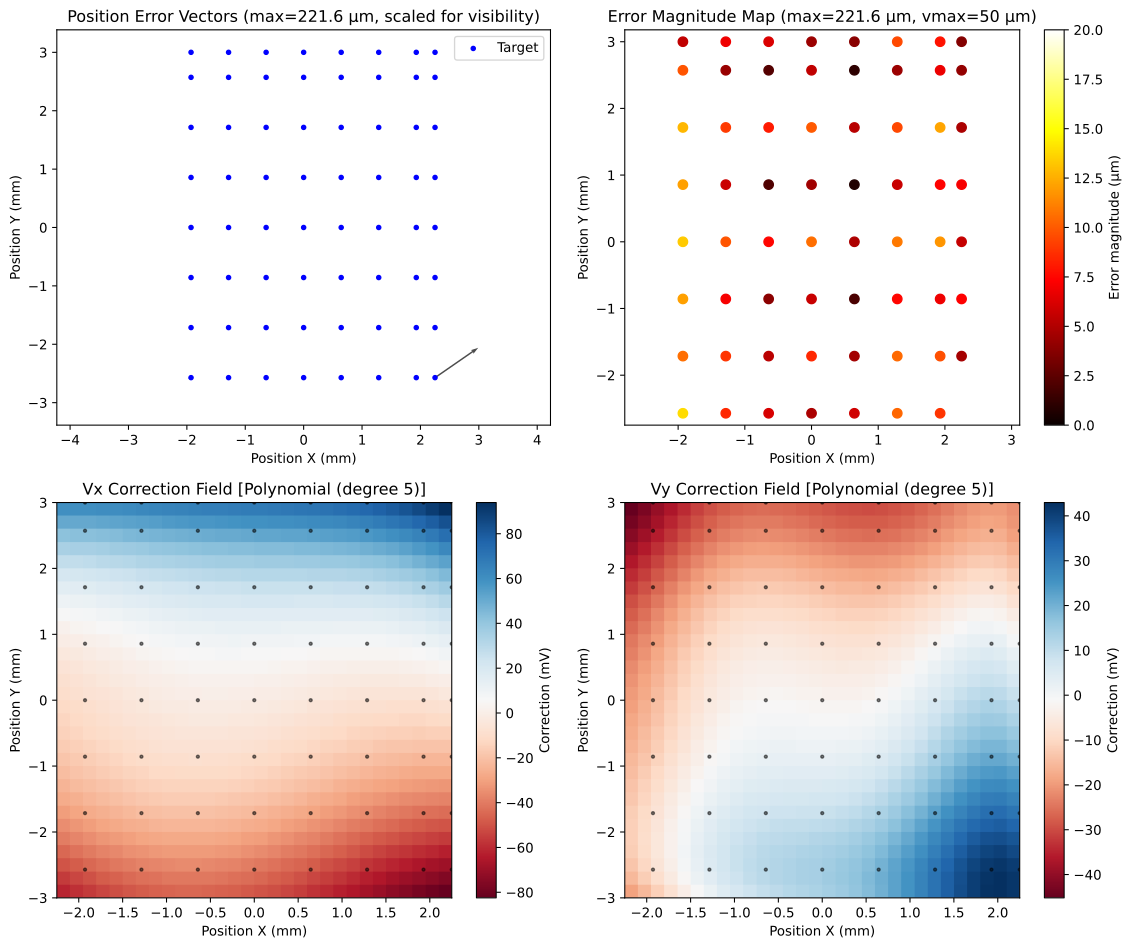 Figure: Galvo LUT calibration showing position errors before and after RBF correction across the field of view.
Step 03: Depth Calibration
Calibrates the Z-axis by measuring focal plane positions at multiple SLM-commanded depths using hologram defocus.
Purpose
Establishes the linear relationship between SLM hologram depth units (ij_z) and physical stage Z positions (mm):
stage_z = z0 + s * ij_z
Setup
We display hologram patterns targeting different depths (in ij_z depth units). For each of them, we are performing a Z scan using the translation stage and capturing images. We then use the small linear model to estimate s.
Workflow
- Initialize hardware and load calibration data from scripts 00-02
- Generate test holograms at multiple depth values (e.g., -60000 to +60000 ij_z)
- At each depth, perform a Z-scan by moving the stage through focus
- Detect spot and fit Gaussian to find optimal focus position
- Fit linear model to depth vs stage-Z data
- Save calibration parameters
Outputs
calibration_data/depth_calibration.json:z0_mm: Stage Z position at ij_z = 0s_mm_per_ijz: Slope (mm per ij_z unit)- Fit residuals and statistics
calibration_figures/03_depth_calibration_fit.svg: Linear fit plot
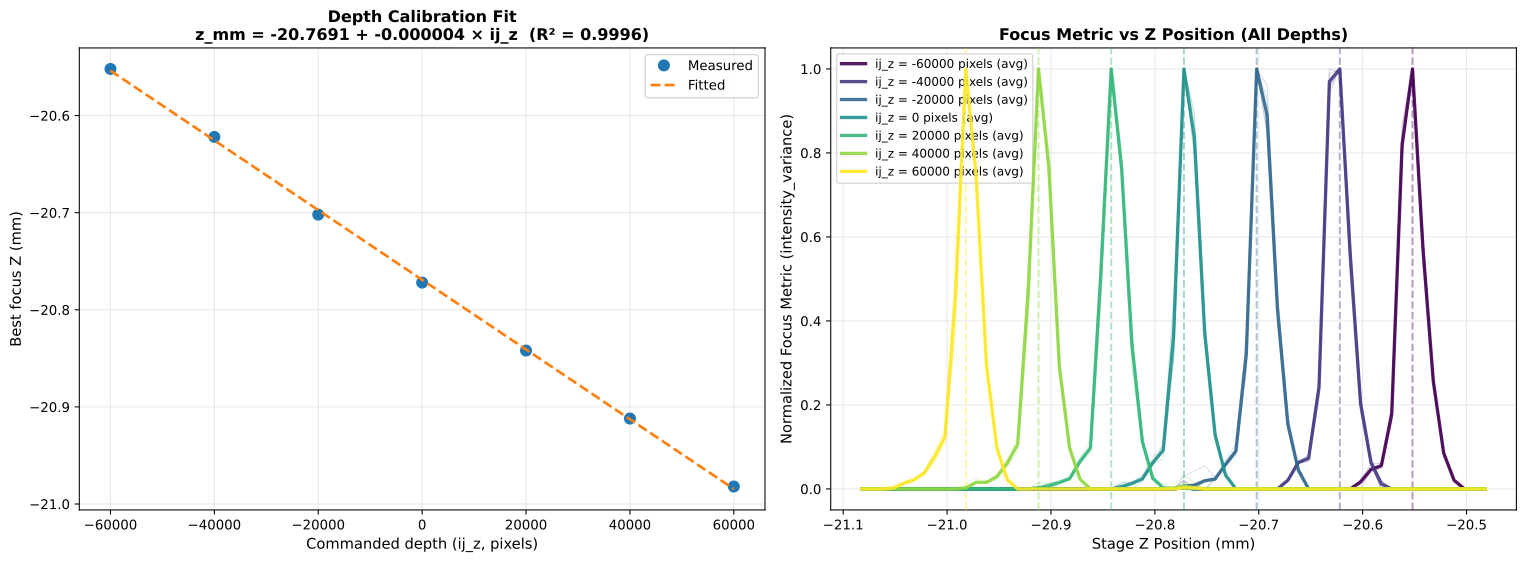 Figure: Depth calibration showing linear relationship between SLM depth units and physical stage Z position.
Step 04: 5D Field Aberration & Telecentricity Calibration
Measures and corrects telecentricity errors and field curvature across the full 5D parameter space: field position (2D) × hologram depth (1D) × spot XY within hologram (2D).
Purpose
When displaying spots at depth, the apparent XY position shifts depending on field galvo position (telecentricity). Additionally, the best focus depth varies across the field of view (field curvature). This script maps both systematic errors and builds correction models.
Setup
Requires all prior calibrations. Full hardware operational including Z-stage for focus scanning.
Workflow
- Load all prior calibrations (scripts 00-03)
- At multiple field positions across the FOV:
- Generate holograms with regular spot grids at discrete depth planes
- Acquire Z-stacks and detect spot positions
- Measure XY displacement error vs target position
- Fit slope model: XY correction as function of (V_x, V_y, ij_z)
- Fit field curvature model: compute best-Z residuals (measured vs predicted focus depth) per field position, fit a 2D surface model for depth correction
- Generate diagnostic visualizations
Outputs
calibration_data/slope_model.npz:- Polynomial coefficients for X and Y correction
- Field position and depth dependencies
calibration_data/field_curvature_model.npz:- 2D surface model for focus depth correction across the field
calibration_figures/04_telecentricity_quiver.svg: Error vector fieldcalibration_figures/04_field_curvature_model.svg: Field curvature surface
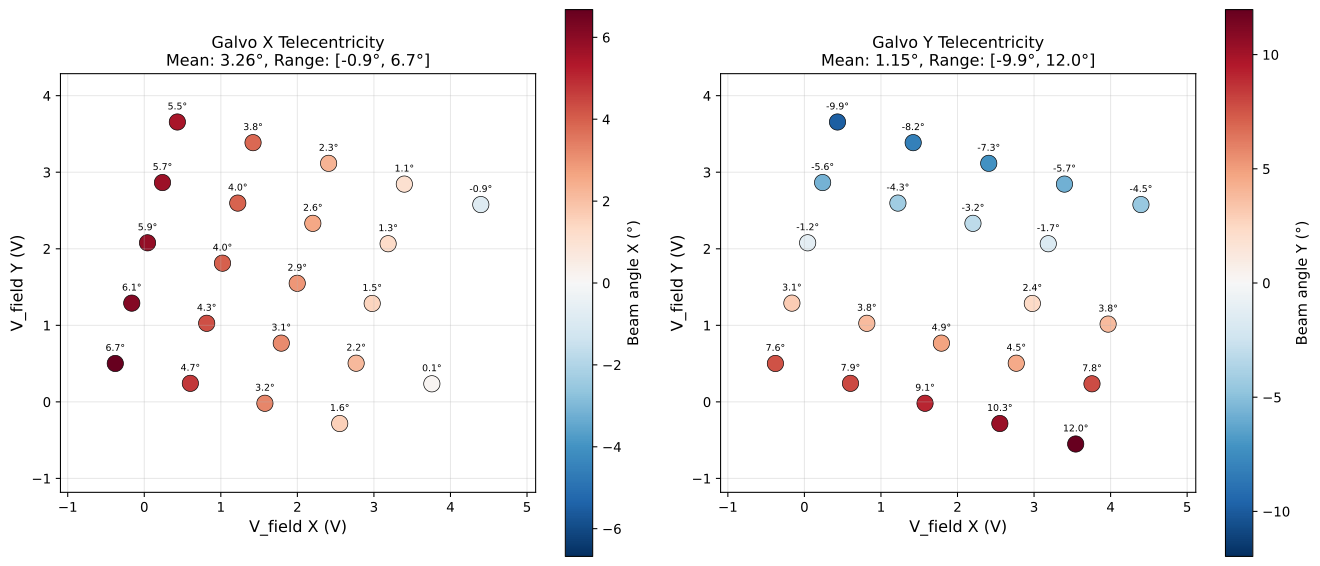
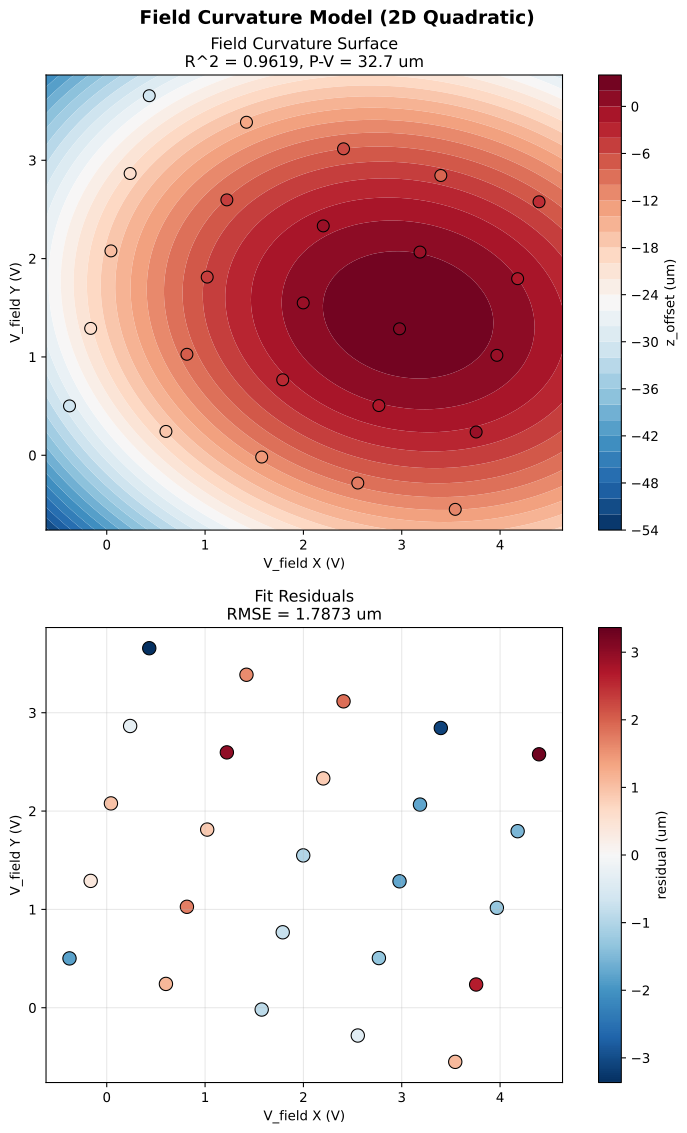
Figure: Telecentricity error vectors showing systematic XY displacement patterns across the field of view at different depths.
Step 05: Telecentricity Refinement
Refines the telecentricity correction model from calibration script 04.
Purpose
Script 04 computes the initial slope model using regular spot grids at discrete depth planes. This script refines the calibration using realistic 3D holograms with randomly distributed spots across the full depth range, which better represents actual experimental conditions. The refinement captures residual errors (global offset, depth-dependent trends) not fully corrected by the initial slope model.
Workflow
Phase 1 - Data Collection:
- Generate a regular grid of field positions across the FOV
- At each position, run a per-field Fourier calibration (optionally with field curvature defocus correction from script 04)
- Generate random 3D hologram targets (not grids)
- Apply telecentricity and optional field curvature correction from script 04
- Acquire z-stacks for offline spot detection and error analysis
- Save all data to HDF5
Phase 2 - Analysis & Refinement:
- Detect spots in z-stacks using sum-projection + find_peaks + matching
- Compute per-spot errors (detected vs target positions)
- Fit residual error models:
- Global XY offset (constant bias)
- Depth-dependent correction (polynomial vs ij_z)
- Save refinement parameters for use in experiments
- Generate diagnostic plots and statistics
Outputs
calibration_data/telecentricity_test_data.h5: Collected z-stack datacalibration_data/telecentricity_test_cache.npz: Detection cachecalibration_data/global_xy_offset.npz: Global offset refinementcalibration_data/depth_correction_model.npz: Depth-dependent refinementcalibration_figures/05_telecentricity_xy_error_correction.svg: Error scatter plot
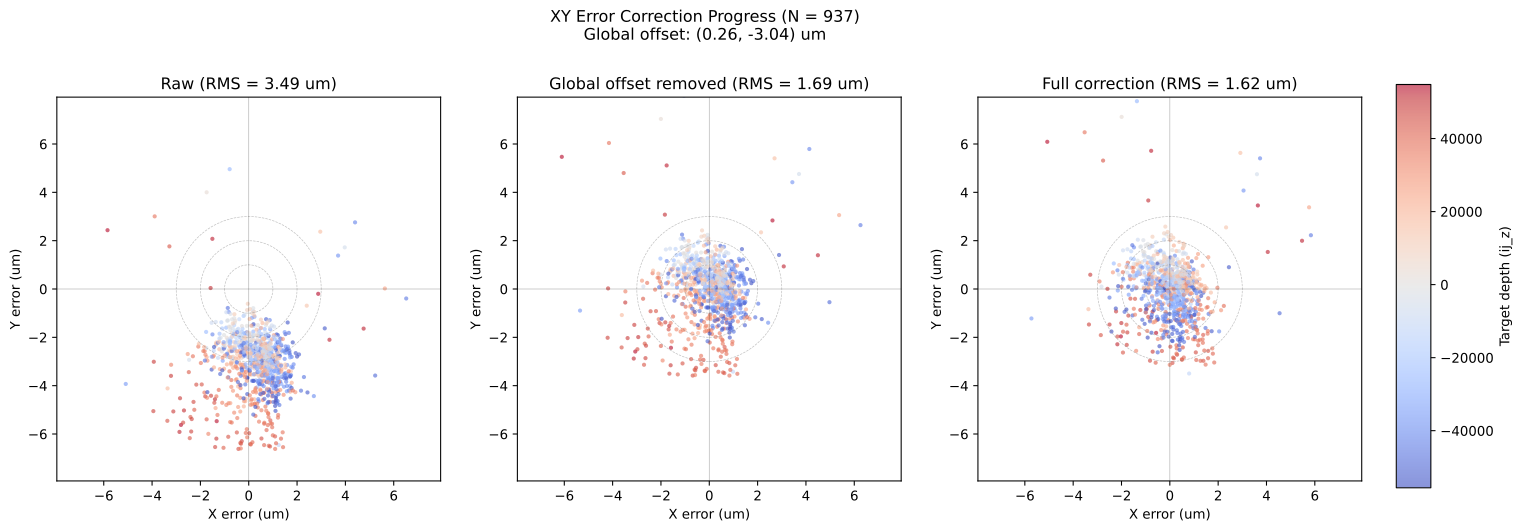 Figure: Telecentricity refinement showing residual XY errors after applying the slope model correction.
Setup
Requires all prior calibrations including the slope model from script 04. Optionally uses the field curvature model from script 04 for defocus correction.
Calibration Data Flow
| Step | Name | Output file(s) | Key parameters |
|---|---|---|---|
| -01 | Spot Centering | config/default.yml | INITIAL_X, INITIAL_Y |
| 00 | Frame Calib | coordinate_frame_calibration.npz | stage & galvo transfer matrices |
| 01 | Galvo Angle | galvo_voltage_to_angle.npz | K matrix, V0 |
| 02 | Galvo LUT | field_galvo_lut.npz | RBF correction |
| 03 | Depth Calib | depth_calibration.json | z0, s_mm_per_ijz |
| 04 | Telecentricity & Curvature | slope_model.npz, field_curvature_model.npz | 5D correction models |
| 05 | Refinement | global_xy_offset.npz, depth_correction_model.npz | global offset, depth correction |
Part 2 — Stimulation and Rush3D Co-registration
After the stimulation path has been calibrated (steps 00–05), the next stage is to co-register the stimulation system with the Rush3D imaging system. This allows stimulation targets selected from Rush3D images to be accurately mapped to galvo voltages and SLM coordinates.
Prerequisite: The Rush3D imager must be independently aligned and calibrated before performing this co-registration. The scripts below assume the Rush3D camera is operational and producing correctly reconstructed images.
Co-registration Sequence Overview
| Step | Script | Purpose | Prerequisites |
|---|---|---|---|
| 06 | field_galvo_grid_scan.py | Map field galvo positions to Rush3D camera coordinates | Steps 01, 02 (optional: 03, 04) |
| 07 | two_step_fourier_calibration.py | Affine transform between SLM k-space and Rush3D pixels | SLM + DAQ hardware, Rush3D camera |
Step 06: Field Galvo Grid Scan
Scans through a grid of field galvo positions while the Rush3D camera captures center-view images at each position, establishing the spatial correspondence between field galvo coordinates and Rush3D camera coordinates.
Purpose
During experiments, stimulation targets are selected from Rush3D images. This script builds the mapping from Rush3D camera space back to field galvo voltages by scanning the stimulation spot across the shared field of view and recording where it appears in the Rush3D image.
Setup
The SLM displays a zero-phase pattern (or a defocus-compensated pattern if field curvature correction is available). The translation stage tracks the galvo deflection so the spot remains in focus on the sample plane. The Rush3D camera captures one image per grid position.
Workflow
- Load galvo voltage-to-angle calibration (step 01) and optionally the galvo LUT (step 02) for improved accuracy
- Optionally load field curvature model (step 04), depth calibration (step 03), and Fourier calibration for defocus compensation at each field position
- Generate a grid of field positions (default: 15 x 15) covering the Rush3D FOV (4.5 x 5.5 mm) in a snake pattern to minimize stage travel
- For each grid position:
- Set field galvo voltages via DAQ
- Update SLM phase with defocus compensation (if available)
- Move XY stage to compensate for galvo deflection (spot tracking)
- Wait for settle time and record actual stage positions and galvo voltages
- Return hardware to initial position and save all data
Outputs
calibration_data/field_galvo_grid_scan.npz:- Grid definition: field positions (mm), voltages (V), FOV parameters
- Actual measurements: stage positions, galvo voltages, timestamps
- Calibration parameters used (K, V0, f_eq)
Step 07: Two-Step Fourier Calibration (Rush3D Camera)
Calibrates the affine transformation between SLM k-space coordinates and Rush3D camera pixel coordinates. This is the Fourier-plane equivalent of the calibration camera’s Fourier calibration, but performed against the Rush3D imaging system.
Purpose
To display holographic patterns that produce spots at specific positions in Rush3D camera space, we need the affine mapping:
ij_Rush3D = M @ kxy + b
where kxy are SLM k-space coordinates, ij_Rush3D are Rush3D pixel coordinates, M is a 2x2 matrix encoding scale and rotation, and b is the origin offset.
Multiple spot-array pitches are used and combined via element-wise median for robustness against individual grid detection failures.
Setup
SLM and DAQ hardware initialized. The Rush3D camera is set up for external capture (image acquisition is manual, not controlled by this script).
Workflow
Step 1 — Display calibration patterns:
- Generate 5 spot-array holograms (8x8 grids) with different k-space pitches (60, 65, 70, 75, 80 knm) using the Gerchberg-Saxton algorithm
- Display each pattern sequentially on the SLM
- Wait for the user to capture each image with the Rush3D camera
- Save generated phase patterns
Step 2 — Calibrate from captured images:
- Load the 5 captured TIFF images from the specified directory
- For each image: crop to the spot region, detect the spot array, and compute the per-grid affine calibration (M, b, a)
- Shift detected positions from cropped to full-frame Rush3D camera coordinates
- Combine all successful calibrations via element-wise median for robustness
- Save combined calibration to HDF5 and generate detection visualizations for QC
Outputs
calibration_data/fourier_calibration_Rush3D_camera.h5:- Combined affine calibration (M matrix, b offset, a origin)
calibration_data/calibration_pattern_pitch{N}.npy: Phase patterns for each pitchcalibration_figures/rush3d_detection_pitch{N}.png: Spot detection visualizations